ClearToPay™ Compliance APFlow™ Settings
Use this page to manage which ClearToPay compliance modules are enabled in your APFlow processes. This gives users the ability to enforce job and vendor compliance by potentially withholding payment. This way, compliance checking takes place during invoice entry, and can inform APFlow users if approval should be granted or a payment processed.
Complete the steps below to configure the settings that allow the system to perform compliance checks based on the accounting systems rules and/or ClearToPay's rules:
From My Paperless, click .
In the navigation bar, click .
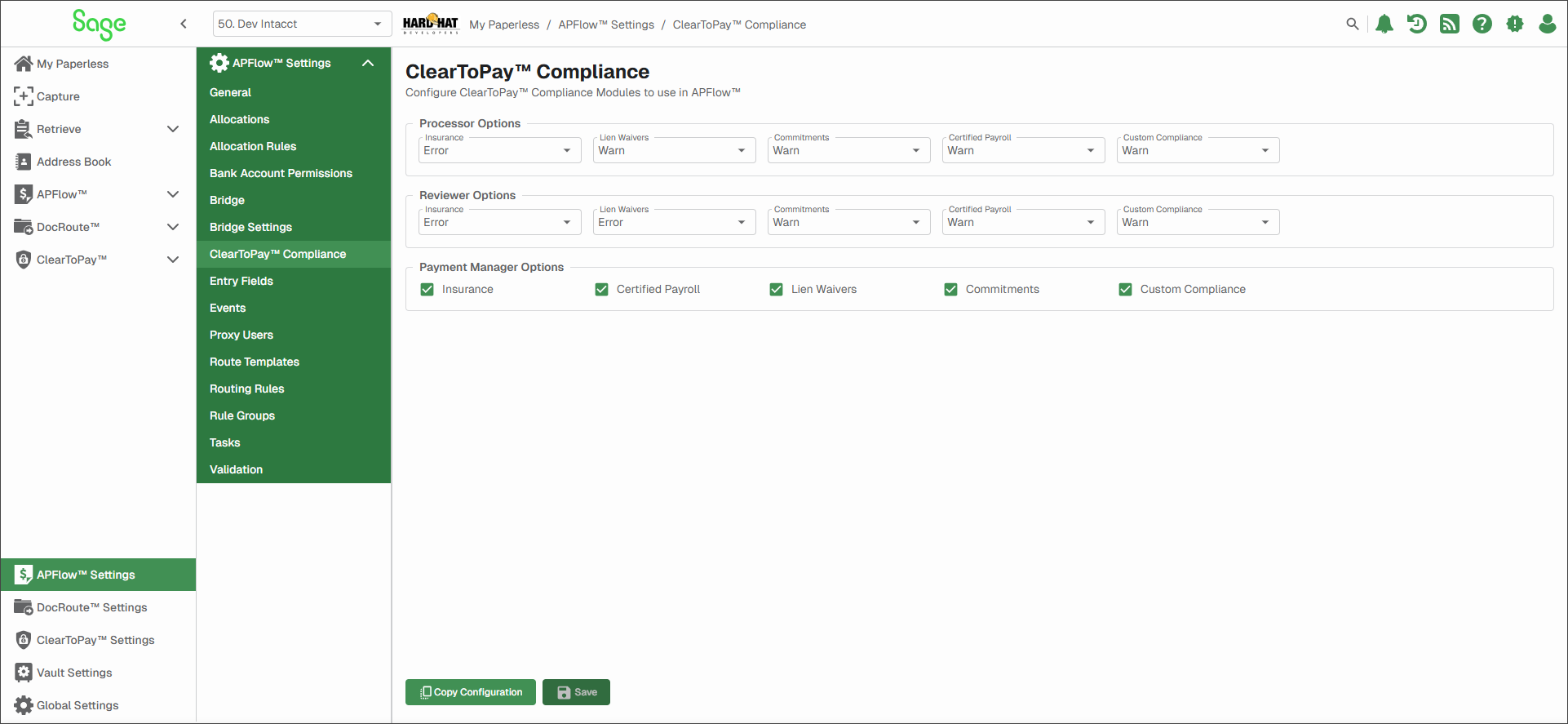
In the Processor Options and Reviewer Options sections, select the appropriate option from the dropdowns. In the Payment Manager Options section, select the applicable check box(es).
Processor Options
Insurance
None: No alert concerning insurance generates to a user in a processor role.
Warn: This is a warning notification. The processor can acknowledge the insurance notification and continue.
Error: This is an error notification. The processor must resolve the insurance issue before continuing.
Lien Waivers
None: No alert concerning lien waivers generates to a user in a processor role.
Warn: This is a warning notification. The processor can acknowledge the lien waiver notification and continue.
Error: This is an error notification. The processor must resolve the lien waiver issue before continuing.
Commitments
None: No alert concerning commitments generates to a user in a processor role.
Warn: This is a warning notification. The processor can acknowledge the commitment notification and continue.
Error: This is an error notification. The processor must resolve the commitment issue before continuing.
Certified Payroll
None: No alert concerning certified payroll generates to a user in a processor role.
Warn: This is a warning notification. The processor can acknowledge the certified payroll notification and continue.
Error: This is an error notification. The processor must resolve the certified payroll issue before continuing.
Custom Compliance
None: No alert concerning custom compliance generates to a user in a processor role.
Warn: This is a warning notification. The processor can acknowledge the custom compliance notification and continue.
Error: This is an error notification. The processor must resolve the custom compliance issue before continuing.
Reviewer Options
Insurance
None: No alert concerning insurance generates to a user in a reviewer role.
Warn: This is a warning notification. The reviewer can acknowledge the insurance notification and continue.
Error: This is an error notification. The reviewer must resolve the insurance issue before continuing.
Lien Waivers
None: No alert concerning lien waivers generates to a user in a reviewer role.
Warn: This is a warning notification. The reviewer can acknowledge the lien waiver notification and continue.
Error: This is an error notification. The reviewer must resolve the lien waiver issue before continuing.
Commitments
None: No alert concerning commitments generates to a user in a reviewer role.
Warn: This is a warning notification. The reviewer can acknowledge the commitment notification and continue.
Error: This is an error notification. The reviewer must resolve the commitment issue before continuing.
Certified Payroll
None: No alert concerning certified payroll generates to a user in a reviewer role.
Warn: This is a warning notification. The reviewer can acknowledge the certified payroll notification and continue.
Error: This is an error notification. The reviewer must resolve the certified payroll issue before continuing.
Custom Compliance
None: No alert concerning custom compliance generates to a user in a reviewer role.
Warn: This is a warning notification. The reviewer can acknowledge the custom compliance notification and continue.
Error: This is an error notification. The reviewer must resolve the custom compliance issue before continuing.
Payment Manager Options
Insurance
Select the check box if the user has access to the bank account associated with insurances.
Certified Payroll
Select the check box if the user has access to the bank account associated with certified payrolls.
Lien Waivers
Select the check box if the user has access to the bank account associated with lien waivers.
Commitments
Select the check box if the user has access to the bank account associated with commitments.
Custom Compliance
Select the check box if the user has access to the bank account associated with custom compliance items.
Click .